

Lazy compilation
Lazy compilation is an effective strategy to improve the startup performance of the development phase. Instead of compiling all modules at initialization, it compiles modules on demand as they're needed. This means that developers can quickly see the application running when starting the dev server, and build the required modules in batches.
By compiling on demand, unnecessary compilation time can be reduced. As the project scales up, compilation time does not significantly increase, which greatly enhances the development experience.
Lazy compilation is only effective for dev builds and does not affect production builds.
How to use
Rspack CLI
For users of @rspack/cli, you can enable lazy compilation through lazyCompilation configuration. Assuming you are developing a multi-page application (MPA), when developing one of these pages, Rspack will only build the entry point you are currently accessing.
lazyCompilation: true is equivalent to:
See lazyCompilation for more details.
When lazy compilation is enabled for entries, entry modules will actually be asynchronously dynamically imported. Therefore if you have configured splitChunks, entry modules will be treated as async chunk, which may result in slight differences between development and production artifacts.
Rsbuild
Use the dev.lazyCompilation option to enable lazy compilation with Rsbuild.
Under the hood
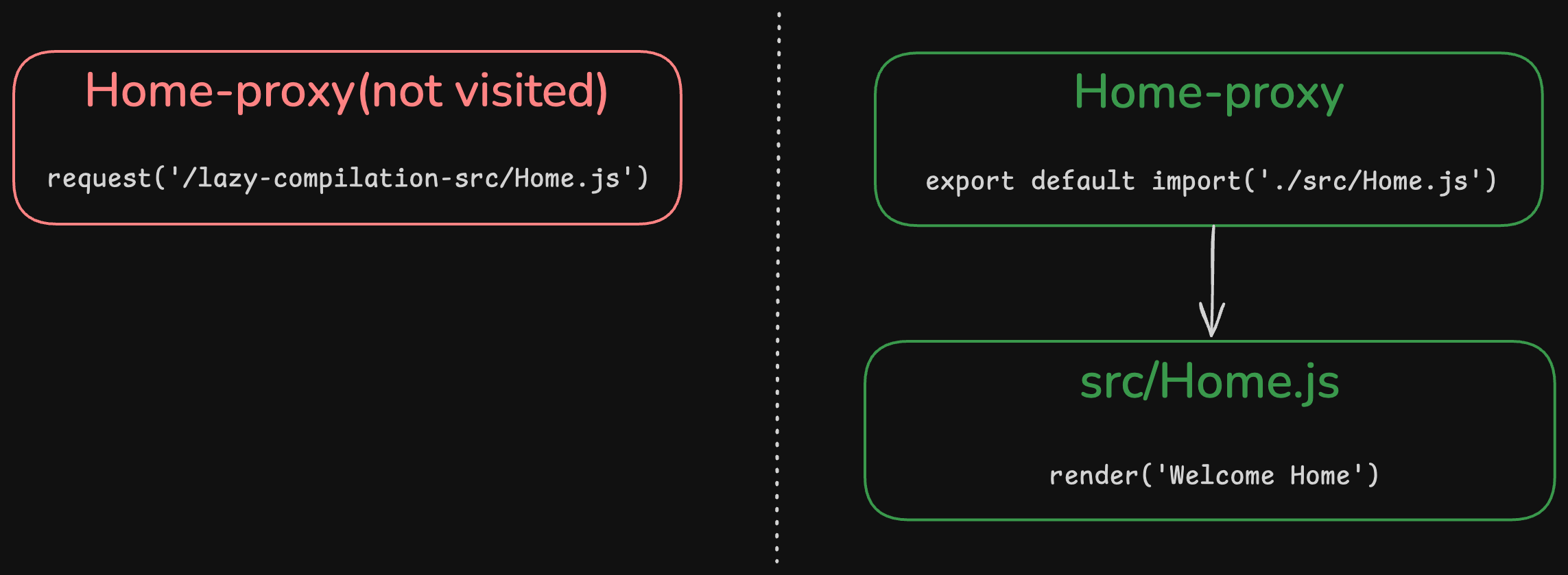
The principle of lazy compilation is to proxy the unexecuted entries and dynamically imported modules. When the module is executed during runtime it sends a request to the dev server, triggering rebuild by Compiler along with module hot updates.
Only when corresponding entries and modules are executed will Rspack compile their respective entries and Modules along with all their dependencies.
Filtering modules
In addition to the entries and imports options, you can use test to filter which modules are lazily compiled.
For example, if you want to disable lazy compilation for the About entry point, you can refer to the following configuration:
Exclude HMR client
If you do not use Rspack's own dev server and instead use your own server as the dev server, you generally need to add another client modules in the entry configuration to enable capabilities such as HMR. It is best to exclude these client module from lazy compilation by configuring test.
If not excluded and lazy compilation of entry is enabled, this client will not be compiled when accessing the page for the first time, so an additional refresh is needed to make it take effect.
For example:
Integrating with custom server
If you are not using Rspack CLI or Rsbuild and are using your own development server, you need to manually integrate rspack.lazyCompilationMiddleware into your development server.
lazyCompilationMiddleware accepts one parameter:
compiler: The current Compiler instance, uselazyCompilationconfig from it.
Customizing lazy compilation endpoint
By default, the lazy compilation middleware uses the /_rspack/lazy/trigger prefix for handling requests. If you need to customize this prefix, you can use the prefix option:
This is particularly useful when you're integrating with an existing system that has specific routing requirements or when you need to avoid prefix conflicts.